


Online Safety - advice for children
CEOP is here to keep children safe from sexual abuse and grooming online. You can make a report directly to the CEOP Safety Centre by clicking on the Click CEOP button if something has happened online which has made you feel unsafe, scared or worried. This might be from someone you know in real life, or someone you have only ever met online. CEOP take all reports seriously and we will do everything we can to keep you safe. As well as making a report to the CEOP Safety Centre, the CEOP Education website has information and advice to help you if something has happened to you online
Staying Safe Online
At our school, we want you to enjoy using technology while staying safe, respectful and responsible.
We teach children how to use the internet safely and we have rules in place to help protect everyone. These rules are part of the school’s Online Safety Policy.
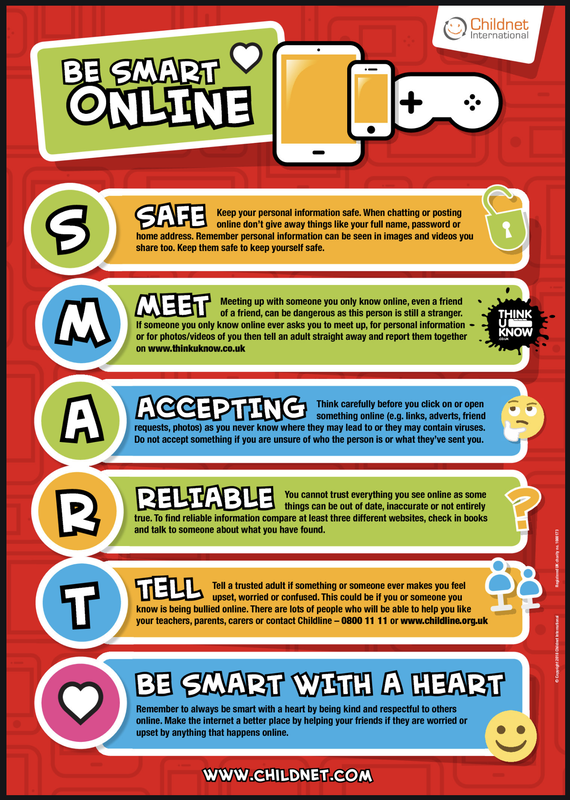
If anything online makes you feel worried, upset or uncomfortable, you should stop what you are doing and tell an adult straight away.
What should I do if I am worried?
If you see or receive something online that you do not like or do not understand:
- Stop and close the screen
- Tell a teacher or another trusted adult at school
- Tell your parent or carer at home
You will never be in trouble for telling an adult.
Telling someone helps keep you and others safe.
Online Safety Rules for Children
When using the internet, computers or tablets at school, I agree to follow these rules:
- I will only use the internet with permission from a member of staff
- I will only visit websites and apps chosen or approved by my teacher
- I will respect other people’s work and privacy
- I will not look at or change other people’s files
- I will not bring memory sticks or devices into school without permission
- I will only contact people that my teacher has approved
- I will use kind, polite and sensible language online
- I will not share personal information such as my full name, address, school or passwords
- I will tell a teacher if I see or receive anything that makes me feel uncomfortable or worried
I understand that the school may monitor computer use and internet activity to help keep everyone safe.
Learning more about Online Safety
These websites are recommended by the school and link directly to what we learn in lessons about online safety. They should be used with an adult.
Advice and Help
- Childnet – Get SMART - Clear rules to help children stay safe online: https://www.childnet.com/young-people/primary/get-smart
- BBC Own It - Support for online worries, gaming, social media and wellbeing: https://www.bbc.com/ownit
- Thinkuknow - Advice and games from the police about staying safe online: https://www.thinkuknow.co.uk/8_10/
Games and Activities
- Google Interland – Be Internet Awesome Games that teach online safety skills: https://beinternetawesome.withgoogle.com/en_us/interland
- Common Sense Media – Digital Passport Games to help children learn how to behave safely online: https://www.commonsense.org/education/digital-passport
Videos and Stories
- The Adventures of Kara, Winston and the SMART Crew - Short videos about online safety: https://www.childnet.com/resources/the-adventures-of-kara-winston-and-the-smart-crew
- DigiDuck Story (KS1) - A story about staying safe online: https://www.childnet.com/resources/digiduck-story
How the School Keeps You Safe Online
- Adults help choose safe websites and apps
- Filters are used to block unsafe content
- Internet use may be monitored
- Staff are trained to help with online safety worries
These measures are part of the school’s Online Safety Policy and Safeguarding procedures.
Remember
- Not everything online is true
- Never keep online worries a secret
- Help is always available
- Telling an adult helps keep everyone safe
Find Out More
Parents and carers can read more about how the school keeps children safe online by visiting the Parents' Online Safety and Safeguarding pages of the school website.